

Hello! I'm
Your hype girl, sounding board, designer, and friend! I design branding and websites for business owners who want to pave the way in their industry.
Sydney.
brand and web design services
I design brands that release the confidence in you.
made for mothers x dfw
I lead the local DFW chapter for a CEO Mom Community, MFM

What It Actually Is, Why It Matters, and How to Do It Right
If you’ve ever Googled yourself and wondered why your competitor shows up and you don’t — or if you’ve ever been told “you need SEO” without anyone actually explaining what that means — this post is for you.
SEO (search engine optimization) gets thrown around constantly in the online business space, and most people either ignore it completely or try to game it in ways that don’t work. What it actually is, at its core, is simple: it’s the practice of making your website easy for Google to read, understand, and recommend.
That’s it. You’re essentially helping Google help you.
I had a client come to a Brand Sprint — my 90-minute session where we untangle every concern, goal, and uncomfortable truth about your business — with a very creative SEO idea. She runs a mobile golf simulator rental company, and her plan was to type every possible misspelling of a word her customers might search into the backend of her site. The logic was there. The execution, not quite.
And she’s not wrong for not knowing. SEO is not her job. It’s mine.
So we scrapped the spelling list, and I set up her actual page titles, meta descriptions, and heading structure before we got off the call.
That moment is why I’m writing this post — because if she didn’t know, you might not either. And this stuff genuinely changes how your site performs.
What Is On-Page SEO and Why Does It Matter?
On-page SEO refers to everything you can control directly on your website to improve how Google understands and ranks your pages. This is different from off-page SEO (backlinks from other sites) or technical SEO (site speed, mobile performance). On-page SEO is the copy, the structure, and the metadata — and it’s the piece most small business owners have the most direct control over.
Here’s the thing most people don’t realize: Google doesn’t experience your website the way your visitors do. It doesn’t see the beautiful brand colors, the custom typography, the photography. It reads text. It scans structure. It looks for signals that tell it what your page is about, who it’s for, and whether it’s worth surfacing to someone who just searched a relevant term.
If you haven’t given Google those signals clearly, it has to guess. And when Google guesses, you usually lose.
The good news is that on-page SEO is very learnable, very doable, and something that pays dividends for a long time once it’s set up correctly. Every website I build includes it — not as an add-on, but woven into the copy and structure from the start.
Understanding Heading Structure — H1, H2, H3, and Everything Else
This is the piece that confuses people the most, because on a well-designed website, all of these look like just words on the page. But structurally, they mean very different things to Google.
H1 — The Most Important Headline on the Page
Your H1 is the single most important on-page SEO signal you have. It tells Google — and your visitor — exactly what this page is about.
One H1 per page. That’s the rule.
Not one per section. Not one per scroll. One. And it should contain your primary keyword for that page — not a vague brand phrase, not your business name alone, not a clever line that sacrifices clarity for personality. It also does not have to be the first thing that appears on your page. It can be in the second or third section it just needs to be labeled correctly in your back end…
Here’s an example…
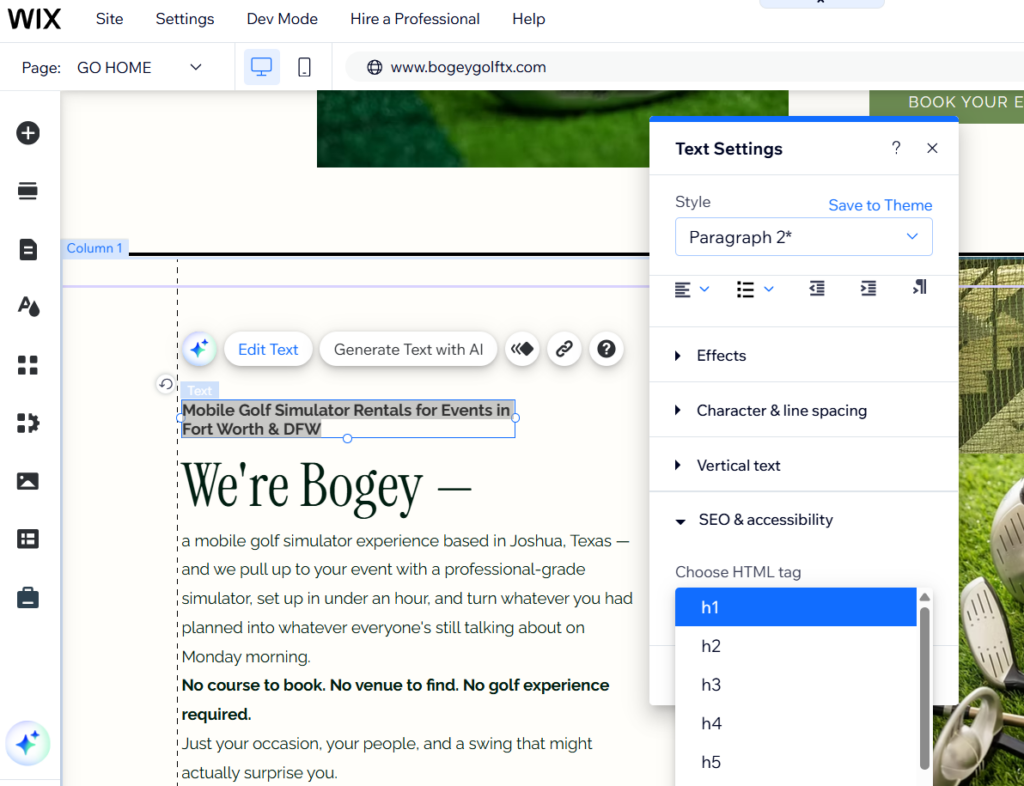
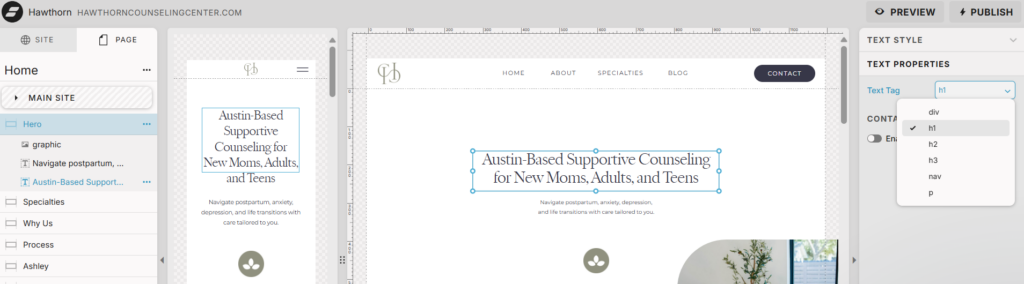
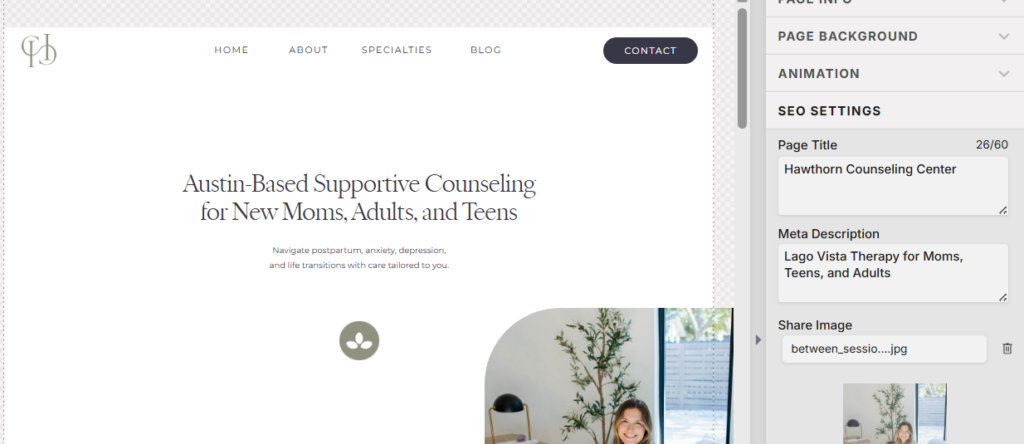
Think about it from Google’s perspective. When someone types “therapy for moms in Austin” into the search bar, Google scans pages for an H1 that confirms: yes, this page is about that. A strong example of this done right is a counseling center I worked with in the Austin area. Their H1 reads: “Austin-Based Supportive Counseling for New Moms, Adults, and Teens.” It tells Google the service, the location, and the audience — all in one line. That’s an H1 working at full capacity.
On a homepage, your H1 might look like:
- “Mobile Golf Simulator Rentals for Events in Fort Worth & DFW”
- “Custom Color Analysis and Personal Styling in Fort Worth, TX”
- “Brand and Website Designer for Service-Based Businesses”
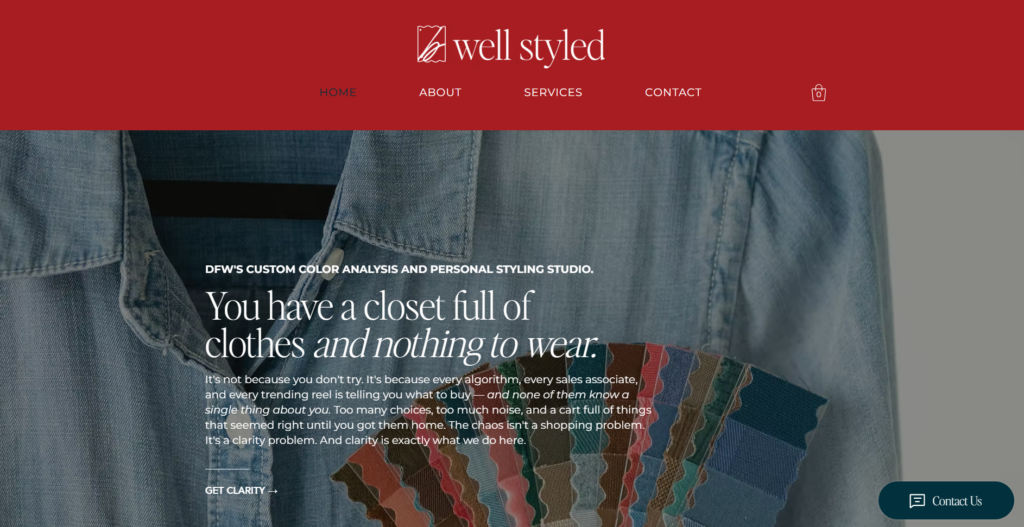
On a services page, it describes what that specific page covers. On a blog post, it’s the title of the post. On the services page we want to make sure it is a more specific description of what you’re actually doing. For example,
- Home Page: Rouse Design Studio Brand and Website Design.
- Services Page: Brand and Website Design Services for Service Based Businesses.
What it should not be: a tagline, a welcome message, a quote, or a line that prioritizes vibe over information. Those have a place in your copy — just not tagged as H1.
H2 — Section Headlines That Support the H1
Your H2s are the supporting headlines that break your page into sections. Think of your H1 as the chapter title and H2s as the sub-headings within it. They signal to Google what each section of the page covers, and they help your visitor scan and navigate.
You can have multiple H2s on a page — and you should. A services page might have H2s like:
- “What’s Included in Your Package”
- “Who This Is For”
- “How the Process Works”
- “Frequently Asked Questions”
These aren’t just organizational. Each one is telling Google: this page goes deep on these topics. That depth matters.
H3 — Sub-Points Within a Section
H3s live inside H2 sections. They break a topic down further. If your H2 is “What’s Included,” your H3s might name each individual deliverable. On a blog post, they organize sub-topics within bigger sections.
Most small business websites don’t need to go deeper than H3. The important thing is that your hierarchy makes sense and flows in order: H1 at the top, H2s for major sections, H3s for sub-points within those sections. Never skip levels — don’t jump from H1 to H3 without an H2 in between.
Navigation Text (nav) — Not an SEO Tool
Your nav links — Home, About, Services, Contact — are wayfinding tools, not ranking signals. Google reads them, but doesn’t give them significant SEO weight. Keep your nav clean and intuitive. The SEO work happens in the content.
Paragraph Text (p) — Where You Talk to Both Google and Your Visitor
Your body copy is where you have the most space to naturally incorporate keywords, context, and information. Good copy does two things at once: it speaks to your ideal client, and it gives Google the context it needs. Write for the human first. Write clearly and specifically. The keywords follow naturally when you’re writing with a real person in mind.
Now for the backend part…
SEO Page Titles — What They Are, Where They Live, and How to Write Them
What They Are
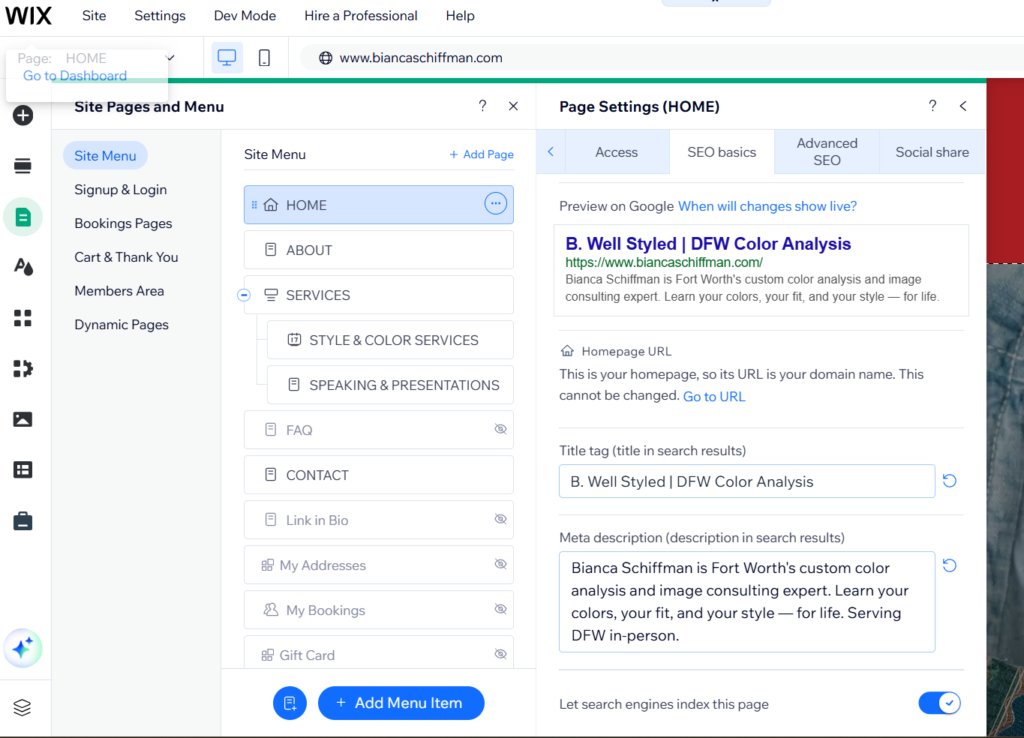
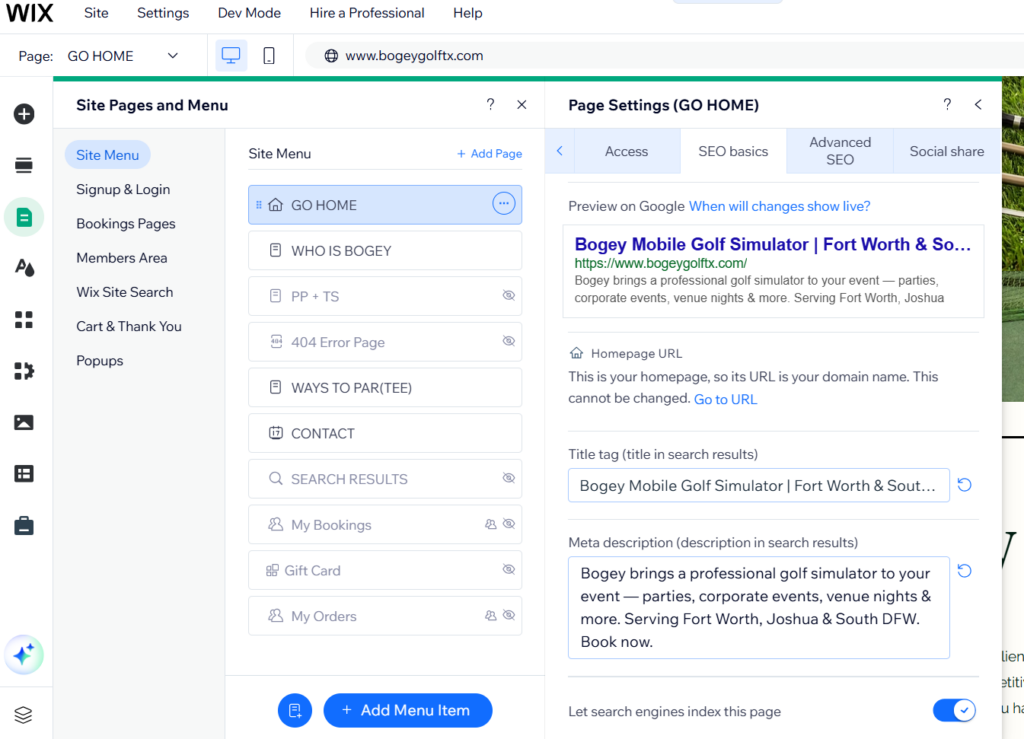
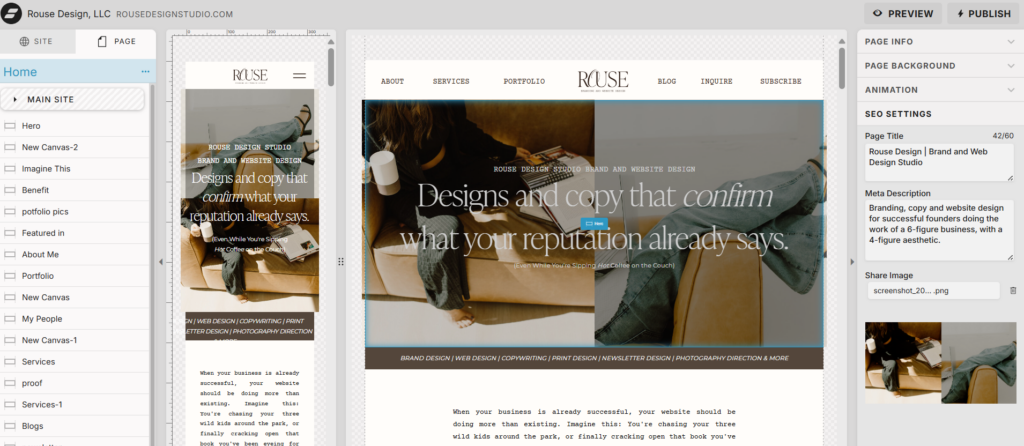
Your SEO page title is the blue clickable text that appears in Google search results. It is not the same as your H1, though they should be related and reinforce each other. It lives in the backend of your website — in Showit, you’ll find it in the page settings panel. In Wix, it’s in the SEO settings for each individual page. It does not appear anywhere on your visible website.
Why They Matter
This is the first thing a potential client sees when they find you on Google. It determines whether they click. A strong page title is essentially a tiny ad for your page — it needs to be clear, specific, and searchable.
How to Write Them
Length: 50–60 characters. Google truncates anything longer, and you lose the end of your message.
Format that works well: Primary Keyword | Supporting Context | Business Name
The most important thing: lead with what someone would actually search, not with your business name or the internal name of the page.
Here are real examples from client sites I’ve built:
Bogey, a mobile golf simulator company serving Fort Worth and South DFW, has a homepage title that reads: “Bogey Mobile Golf Simulator | Fort Worth & South DFW.” Keyword first, location specific, brand name at the end. Their packages page reads: “Golf Simulator Packages & Pricing | Bogey Mobile Golf.” Again — the searchable phrase leads. Nobody Googles “packages.” They Google “golf simulator rental Fort Worth” or “golf simulator pricing DFW.”
That’s the difference between a page title that works and one that just exists.
Every page on your site needs its own unique title. If every page title is just your business name, Google sees a site where every page looks the same and doesn’t know which one to surface for which search.
Meta Descriptions — What They Are and How to Write Them
What They Are
Your meta description is the short paragraph that appears below your page title in Google search results. Like the page title, it lives in the backend — not on your visible page. It’s not a direct ranking factor the way your title and H1 are, but it heavily influences click-through rate. Someone just found you in a search. They’re deciding in about two seconds whether to click you or the result right below.
This is your 160-character pitch.
How to Write Them
Length: 150–160 characters. Anything longer gets cut off mid-sentence in search results, which looks unfinished.
What to include: What the page is about, who it’s for, and a clear reason to click.
Bianca Schiffman, a color analysis and personal styling expert in Fort Worth, has a homepage meta description that does exactly this: it names her specialty, her location, and what the client walks away with — all in two sentences. Specific. Grounded. It gives someone enough information to know immediately whether they’re in the right place.
Bogey’s meta descriptions follow the same principle. Their packages page reads: “From 2-hour hangouts to 6-hour full tournaments — Bogey’s mobile golf simulator packages start at $550. Serving Fort Worth & South DFW. See what’s included.” It leads with the range of options, gives a price anchor, confirms the location, and ends with a soft call to action. That’s a meta description doing serious work.
When you leave this field blank, Google pulls whatever text it wants from your page. Sometimes it pulls something coherent. More often it pulls a sentence fragment or a navigation label. You want to control that first impression.
The Location Strategy — How to Use Your City and Your Suburb Together
This is something most SEO tutorials skip, but it matters a lot for local service businesses.
If you’re based in a suburb of a major metro, you have two audiences searching for you: people searching the big city name, and people searching the specific suburb or neighborhood. The strategy is to use both — intentionally, and in different places.
Put the major metro in your H1. That casts the widest net and captures the highest search volume. Use the specific city or suburb in your meta description, your body copy, and your location page. That captures the hyper-local searcher who already knows where they want to go.
A counseling practice I work with based in Lago Vista, Texas — a suburb of Austin — uses this approach well. The H1 references Austin to capture the broader metro search, while the meta description and on-page copy are specific to Lago Vista for local visibility. Both signals serve a purpose, and together they cover more ground than either one alone would.
Putting It All Together — What a Fully Optimized Page Looks Like
Here’s what it looks like when every element is working together. Using a mobile golf simulator rental company as the example:
SEO Title: Mobile Golf Simulator Rental for Events | Fort Worth & South DFW (58 characters ✅)
Meta Description: Bogey brings a professional golf simulator to your event — parties, corporate events, and venue nights. Serving Fort Worth & South DFW. Book now. (152 characters ✅)
H1 (on the page): Mobile Golf Simulator Rentals for Events in Fort Worth & South DFW
H2s on the page:
- “What We Bring to Your Event”
- “Events We’re Built For”
- “Our Packages”
- “How It Works”
- “Book Your Date”
Body copy: Specific, conversational, written for the person who’s already interested and just needs to understand what they’re getting.
Every layer says the same thing in a slightly different way. Google reads the title, the H1, the H2s, the body copy — and by the end of that read, it knows exactly what this business does, where they operate, and who they serve. That’s a page that can rank.
What Most DIY Websites Get Wrong
You’ve made it this far — that already puts you ahead of most. But here are the patterns I see constantly when I do a site audit before starting a project.
Every page title is just the business name. Google sees a site where every page looks identical. It doesn’t know which page to surface for which search. Neither does your potential client.
The H1 is a brand line instead of a signal. Personality in your copy is good. But your H1 needs to earn its keep. “This is where the clarity begins” is beautiful. It also tells Google absolutely nothing about what the page is.
There are multiple H1s on one page. This is the most common issue I find on Wix and Showit sites, and it’s not your fault — these platforms let you style text visually without managing the heading structure behind the scenes. Something can look like a headline on screen and be tagged H1, H2, or styled paragraph text in the code. You have to go into the backend settings to verify that only one element per page is actually tagged H1.
The meta description is blank. Google fills it in for you when you leave it empty. It does not do a great job. Control that first impression.
The copy is vague everywhere. “I help women step into their power.” “We bring the fun to you.” These phrases belong in your copy — but not as the only description of what you do. Every page needs to say, specifically, what the service is, where it’s available, and who it’s for.
Keywords are treated like a list instead of a conversation. Repeating a keyword fifteen times, or listing every possible search variation in a hidden field — neither of those is a strategy. Write the way your ideal client actually searches. Answer the questions they’re asking. The right keywords show up naturally when you’re writing specifically for a specific person.
The Bottom Line
SEO is not magic. It’s not a hidden field to stuff with keywords. It’s the practice of being clear — clear to Google about what you do, clear to your potential client about whether you’re the right fit, and clear in your structure so both of them can find what they need.
And by the way, editing your H1s and page descriptions will not immediately shoot you ip to number 1 in a google search. You have to give google time to crawl your site and get to know you, and make sure you’re set up with google business and google analytics (this helps). SO please don’t come for me when this magic trick doesn’t work, I am telling you now, its not a magic trick.
When your H1 is specific, your page titles are searchable, your meta descriptions earn the click, and your copy speaks directly to the person you’re trying to reach — your website stops being a digital placeholder and starts being a tool that works for you around the clock.
That’s the goal.
Every website I build includes SEO-optimized copy, page titles, meta descriptions, and proper heading structure — because a site that nobody can find isn’t doing its job. If you’re ready for a brand and website that actually works for you, let’s talk.

Hi, I'm Sydney. The problem solving brand and website designer!


